Real-time strategy games usually allow a user to click and drag a box to select all the units within that box. A single left click would clear the selection.
I have not found a tutorial that uses the UI canvas for this, so I
took it upon myself to implement a solution and share it.
Setting Up The Scene
A unit–it could be a box– is needed to be the thing that a user selects, then a plane is needed for our ground,
and finally a canvas element.
Setting Up The Unit
Your box should look something like this
Create a box game object
Attach an empty child game object– this will be our halo
Add a projector component to it
Add a collider component to ensure raycasts will hit it
Your halo should look like so
The projector component has to ignore all layers except the ground layer. Or
else the projector will project the halo on top of other units / objects.
Full credit where credit is due, I took the halo and some code from this blog post.
Setting Up The UI Canvas
Create a canvas element and then attach an image component, this will be our
select box.
It should look the this
Code Pieces
SelectionController - Manages which entities are within a box.
UiController - Renders the selection box on screen.
SelectUtil - Contains core logic for finding entities within a box.
I wrote about my game architecture in an other post. I recommend you read that to understand how these controllers connect with each other.
Creating Selection Controller
publicclassSelectionController{privateLevellevel;privateTeamplayerTeam;publicList<Entity>selection{get;privateset;}privateVector3anchor;privateVector3outer;privateboolhasActiveBox;publicSelectionController(Levellevel){this.level=level;selection=newList<Entity>();this.playerTeam=level.playerTeam;}publicvoidClearSelection(){RemoveAllSelections();EventManager.Instance.TriggerEvent(newSelectionEvent(selection));}privatevoidAddToSelection(Entityentity){DebugUtil.Assert(entity!=null,"Selected object with no entity");selection.Add(entity);entity.transform.Find("Halo").gameObject.SetActive(true);}privatevoidAddAllWithinBounds(){Boundsbounds=SelectUtils.GetViewportBounds(Camera.main,anchor,outer);this.level.playerTeam.ForEach((Entity entity)=>{if(SelectUtils.IsWithinBounds(Camera.main,bounds,entity.transform.position)){AddToSelection(entity);}});}privatevoidAddSingleEntity(){Entityentity=SelectUtils.FindEntityAt(Camera.main,anchor);if(entity!=null){if(entity.team==level.playerTeam){AddToSelection(entity);}}}privatevoidRemoveAllSelections(){foreach(Entityentityinselection){entity.transform.Find("Halo").gameObject.SetActive(false);}selection.Clear();}publicvoidSelectEntities(){RemoveAllSelections();if(outer==anchor){AddSingleEntity();}else {AddAllWithinBounds();}hasActiveBox=false;EventManager.Instance.TriggerEvent(newSelectionEvent(selection));}publicvoidCreateBoxSelection(){hasActiveBox=true;anchor=Input.mousePosition;outer=Input.mousePosition;EventManager.Instance.TriggerEvent(newStartSelectBoxEvent(anchor));}publicvoidDragBoxSelection(){if(hasActiveBox){outer=Input.mousePosition;EventManager.Instance.TriggerEvent(newDragSelectBoxEvent(outer));}}}
When the left-click button is first pressed the initial box position is placed. As the mouse moves the DragBoxSelection will update the boxes size and trigger events for the UiController to render on screen.
I like to break out core logic like this into its own utility, for unit testing and reusability. This can be used for other features, like figuring out which units are within an attack range.
The final piece is the UiController this actaully renders the image on screen to see which units will be selected. Remember it’s best practice to always separate view from logic, for reusability and testing. The RectTransform was used to convert mouse clicks into a canvas position, so the box would appear in the correct place.
I’ll be continuing the series next with commanding entities to move.
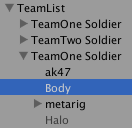 Your box should look something like this
 Your halo should look like so
 Position the halo like so on the unit
 Download this and use it as the texture
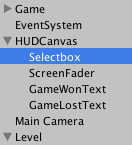
 It should look the this
Comments
No comments yet. Be the first.